
Introducing CUBLOC Studio 5.0: A New Development Experience for CUBLOC
CUBLOC Studio 5.0 Is Here
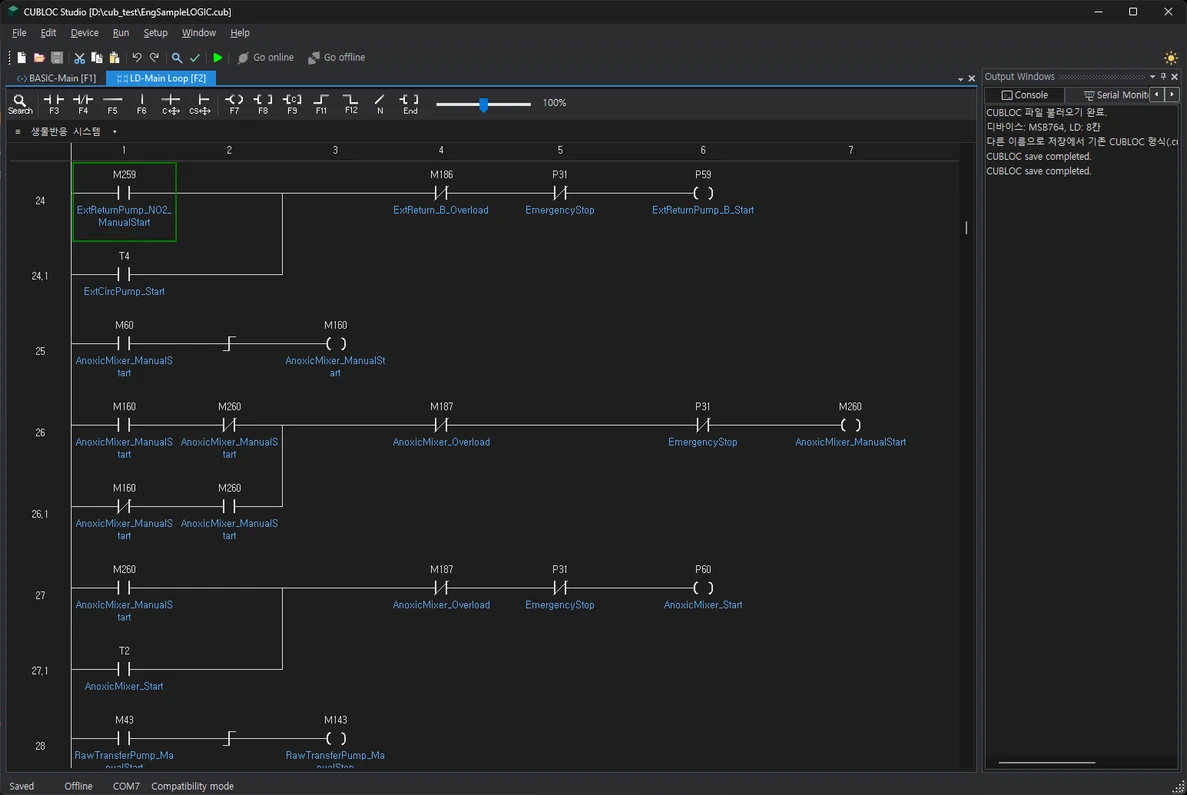
CUBLOC Studio 5.0 brings a refreshed development environment to CUBLOC BASIC and Ladder Logic programming. With improved editing tools, flexible workspace layouts, built-in AI technical support, and a standalone program downloader, the new release makes everyday development and field deployment easier.
Whether you are maintaining an existing application or starting a new project, Studio 5.0 gives you more convenient ways to write, navigate, and download your programs.
A Workspace That Fits Your Workflow
Arrange the project panel, data view, toolbox, and output window to suit the way you work. Choose a classic or expanded layout, switch between light and dark themes, and customize editor fonts, text size, tabs, and line numbers.
Find BASIC Sub and Function routines quickly, jump to their definitions, and locate source code associated with compiler errors.
More Convenient Ladder Editing
Updated Ladder editing tools help you make changes with less effort.
- Undo and redo edits.
- Find and replace text.
- Insert rows and paste logic.
- Zoom in or out for a comfortable view.
- Place comments and logic on the same row.
- Manage address aliases and descriptions through the address table.
These improvements make both small adjustments and larger program updates easier to manage.
Two Compilation Modes
Studio 5.0 provides two modes for working with new and existing applications.
Normal Mode uses newly developed BASIC and Ladder compilers. It applies stricter checks to program input, addresses, and value ranges, helping identify potential problems before downloading.
Compatibility Mode prioritizes existing applications by preserving the compilation behavior of the previous Studio as closely as possible.
When moving an existing project to Normal Mode, check the compilation results and verify operation on the target device.
Clearer Device Connection and Downloads
View COM port information, follow download progress, and cancel a transfer when needed. Studio checks the device model and firmware checksum before sending the program.
If the selected execution mode requires different firmware, Studio updates the firmware automatically and checks it again before downloading.
The integrated data view and serial monitor also keep useful information close to your programming workspace.
CUBLOC Guidance Inside Studio
Built-in AI technical support provides manual-based guidance on CUBLOC features, commands, and usage.
Use it to look up a command or clarify how a feature works without leaving Studio. An internet connection is required. This feature is intended for usage questions and command guidance; source code generation and review are outside its scope.
Deploy Programs Without Sharing Source Code
Save your compiled program as an OBJ file and send it to the person installing or updating equipment.
The included OBJ Downloader lets them select the OBJ file and COM port, then transfer the program without opening the Studio editor or receiving the original source code.
New OBJ files include the target model, execution mode, and SHA-256 integrity information. Use Studio 5.0 or its included OBJ Downloader to download these files.
Get Started with CUBLOC Studio 5.0
CUBLOC Studio 5.0 runs on 64-bit Windows, including Windows 11. The installer includes the required .NET runtime.
It supports opening and saving existing BASIC CUB files and MPGL3-format CUL files. Some older CUL formats and discontinued TPC models are not supported.
Recent Posts
-
Introducing CUBLOC Studio 5.0: A New Development Experience for CUBLOC
CUBLOC Studio 5.0 Is Here CUBLOC Studio 5.0 brings a refreshed development environment to CUBLOC BA …Nov 4th 2026 -

ComfileWEB: Free, Web-Based, No-Code PC HMI Software
Introducing ComfileWEB: Design. Connect. Control. Building a PC interface for industrial equipment …Oct 29th 2026 -

[New Product] CPi-G070WR — Raspberry Pi 5 Performance for Industrial Applications
Meet the CPi-G070WR: Raspberry Pi 5 Performance for Industrial Applications Your next industrial pan …Sep 26th 2026