
Description
Need a simple and reliable user interface without the overhead of graphics or touch screens? The UIF Series provides an efficient solution by combining a character LCD and keypad input into a single, compact module. It is ideal for applications where clarity, reliability, and cost efficiency are more important than advanced visual effects.
For projects that do not require complex graphics, the UIF Series offers a clean and practical alternative. The LCD is used to display system messages and menu text, while the integrated keypad allows direct user input. This approach keeps both hardware and software design straightforward, making it well suited for industrial equipment, control panels, and embedded devices.
Communication is handled entirely through RS-232. Text data sent from the host system is displayed on the LCD, and every key press is returned to the host as a key code over the same serial line. By unifying display output and keypad input on a single interface, the UIF Series simplifies wiring, reduces I/O usage, and shortens overall development time.
- Key press data transmitted to host via RS-232
- Text received via RS-232 displayed on a 20 × 4 character LCD
- 5 built-in status LEDs for visual feedback
- Selectable key-press audio feedback (on/off)
- RS-232 fixed configuration: 115200 bps, 8 data bits, no parity, 1 stop bit
FAQ
Q: Do I need to program this device?
A: No programming is required on this device itself.
This product is simply an LCD display with a keypad — it does not have a built-in controller. You connect it to an external controller such as an MCU or an Arduino. When the controller sends data via RS-232, the text appears on the LCD. When a key is pressed, the keypad sends a corresponding code back to the controller. In short, the controller handles all the logic, and this module works purely as an input/output interface.
Q: Why are the keys arranged this way?
A: This layout is intentional and based on real-world industrial use.
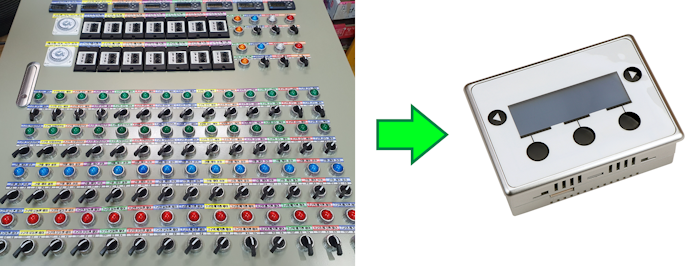
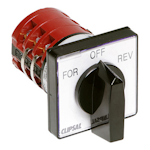
In many industrial control panels, you’ll often see a 3-position selector switch with a very similar layout. This keypad was designed to replace that type of selector switch in applications where one of three options needs to be selected. It provides the same intuitive operation as a traditional selector switch, but in a digital form that’s easier to integrate with controllers.
Q: How does it replace a 3-position selector switch?
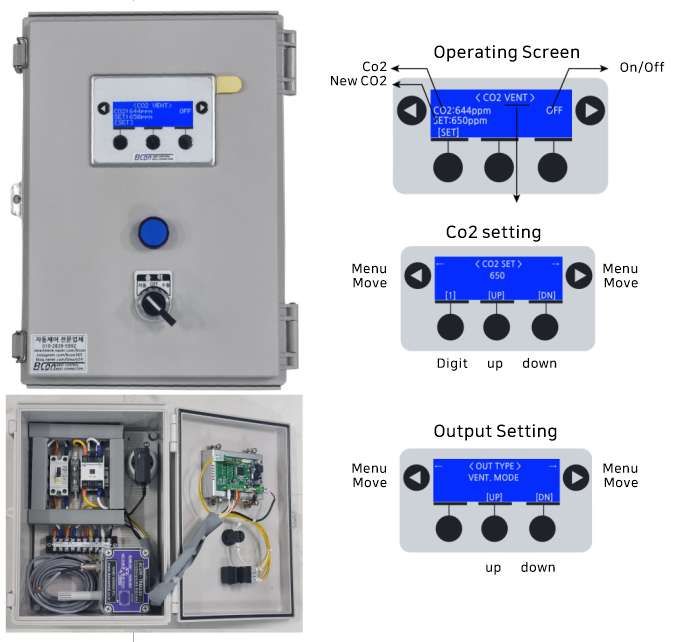
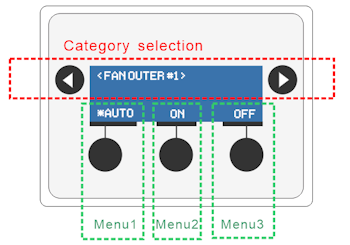
A: As shown in the diagram below, you use the left and right arrow keys to move between categories. Once the desired option is highlighted, you press the MENU key to select one of the three options. This provides the same selection behavior as a physical 3-position selector switch, but using simple keypad navigation instead of a mechanical switch.
Q: I see. So this can replace many 3-position switches?
A: Yes, exactly.
If your control panel uses a large number of 3-position selector switches, this approach is well worth considering.
By replacing multiple mechanical switches with a single keypad-based interface, you can significantly reduce manufacturing cost, wiring complexity, and assembly time.